Some browsers ship code that checks which domain you’re visiting and changes how the page renders based on it.
Yup, you read that right. If site == X, do Y.
TikTok gets special treatment. So does Netflix. So does Instagram.
And so does SeatGuru.
Safari and Firefox both do this. Chrome doesn’t.
That tells us something interesting.
The source code is right there if you want to look. These are literal domain checks baked into browser rendering engines that say things like “if the user is on this domain, render this differently” or “if they’re on that domain, handle that API call differently.” It’s not a bug. It’s a feature, and it ships to billions of devices.
Firefox’s about:compat
If you open Firefox and type about:compat in the address bar, you’ll see a list of site-specific interventions complete with toggle switches. Each one is a targeted fix for a specific website, and you can turn them off and watch sites break.
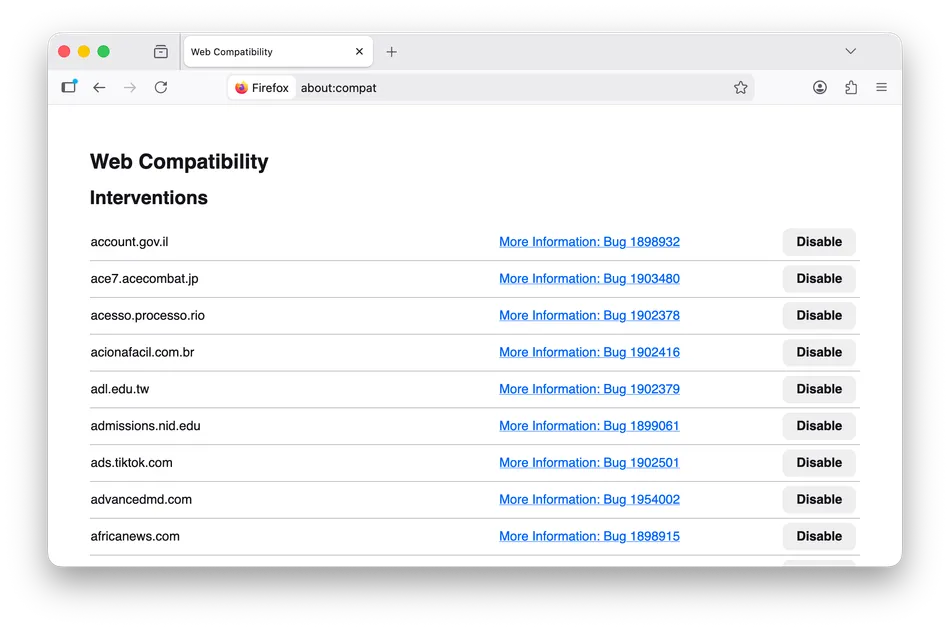
Firefox’s WebCompat system injects custom CSS and JavaScript into specific domains, changes user agent strings for sites that sniff browsers incorrectly, and papers over bugs that would otherwise make the web feel broken. The interventions are tracked in Mozilla’s Bugzilla, complete with bug reports and sometimes failed outreach attempts to the sites in question.
Safari’s “quirks”
Safari’s WebKit engine calls them “quirks,” and the file Quirks.cpp is publicly available on GitHub. Reading through it is an education in how the web actually works. Here’s one comment from the code:
Facebook, X (twitter), and Reddit will naively pause a <video> element that has scrolled out of the viewport, regardless of whether that element is currently in PiP mode.
So the browser detects when you’re on facebook.com, x.com, or reddit.com and changes how it handles Picture-in-Picture video. These companies wrote broken video code, and rather than wait for them to fix it, the browser shipped a workaround to every user. Here’s another comment:
FIXME: Remove this quirk if seatguru decides to adjust their site.
Someone added domain-specific rendering code for SeatGuru, and the comment implies outreach was attempted. SeatGuru didn’t fix their site, so the browser fixed it for them.
The commit history is a fascinating read. In just the last few months: Zillow’s floorplan images weren’t centering, TikTok was showing “please upgrade your browser” messages, Instagram Reels were resizing erratically during playback, Netflix’s “Episodes and Info” button was dismissing popovers incorrectly, Twitch was pausing PiP videos when you switched tabs, and Amazon Prime Video wasn’t letting Safari users watch at all. Each one got a domain-specific fix shipped to every single user.
Chrome Is Different
The quirks files aren’t just fixing broken sites; they’re often compensating for Chrome’s control over what “working” means in the first place.
The pattern goes like this: Chrome ships a feature, developers use it because Chrome dominates the market, and other browsers scramble to either implement the feature or add site-specific quirks to paper over the difference. By the time Safari or Firefox catches up, the quirk has already shipped to millions of users.
WebKit’s source code includes user agent overrides that make Safari pretend to be Chrome for specific sites like Amazon’s video pages and various streaming services. These sites sniff for Chrome and serve degraded experiences to everyone else, so rather than let Safari users suffer, WebKit lies about what browser it is. From the current Quirks.cpp source:
auto chromeUserAgent = "Mozilla/5.0 (Macintosh; Intel Mac OS X 10_15_7) AppleWebKit/537.36 (KHTML, like Gecko) Chrome/143.0.0.0 Safari/537.36"_s;
Safari literally ships with a fake Chrome user agent string, ready to deploy when sites refuse to work otherwise. Firefox does the same thing, and many of its about:compat interventions are user agent spoofs telling sites “yes, I’m Chrome” because those sites actively block or break on non-Chrome browsers. The Mozilla wiki explains that some sites “block access completely, display a different design, or provide different functionality” based on browser detection. So Firefox ships workarounds.
This creates a feedback loop. Developers build for Chrome because Chrome dominates. Their sites work best in Chrome. Users who hit bugs elsewhere blame the browser, not the site, so they switch to Chrome, reinforcing its dominance.
It Goes Deep
These aren’t just cosmetic tweaks. Browsers change fundamental behavior based on your domain, including scrolling behavior, touch event handling, viewport calculations, and image MIME type handling. The list in WebKit alone runs to thousands of lines.
Here’s one about simulated mouse events:
When panning on an Amazon product image, we’re either touching on the #magnifierLens element or its previous sibling.
The browser checks if you’re on Amazon and changes how touch-to-mouse event translation works for their product zoom feature. Amazon’s site assumes certain event behavior that Safari doesn’t provide by default, so Safari provides it anyway, but only for Amazon.
There are quirks for storage access, scrollbar rendering, autocorrection behavior, and zoom handling. Each one is behind a domain check, and each one is compiled into the browser executable.
Chrome Doesn’t Need a Quirks File
You might have noticed something. I’ve shown you Firefox’s about:compat and WebKit’s Quirks.cpp, but where’s Chrome’s equivalent?
Chrome doesn’t really need one, and not necessarily because Chrome is better engineered. The web is already built for Chrome. When over 80% of users browse with Chromium-based browsers, developers build for Chrome first. If a site works in Chrome, it ships. If it breaks in Safari or Firefox, they decide, knowingly or otherwise, that it’s less of a problem.
Chrome doesn’t add quirks; it sets the agenda. When Chrome changes how something works, sites update to match, and other browsers follow or break.
This is the asymmetry that runs through the modern web. When a site breaks in Safari, WebKit engineers add a quirk. When Chrome wants to change how the web works, Chrome just changes it and everyone else adapts. Chrome doesn’t need quirks because Chrome’s interpretation of web standards is the version that everyone else works to.
This isn’t done maliciously and it isn’t entirely Google’s fault; really it’s the natural consequence of market dominance. Browser engineers will tell you the specs themselves are actually well-defined now. The HTML5 “living specification” approach solved the chaos of the IE/Netscape era by making specs match reality. The problem is that developers rely on unspecified implementation details, then blame non-compliant browsers when those details differ.
While that may be true, it doesn’t change the outcome. When Chrome is the implementation everyone targets, Chrome’s unspecified details become the de facto spec. The same thing happened with Internet Explorer in the 2000s. When developers built for IE, sites broke elsewhere, and standards compliance became secondary to just making it “work in IE.” We spent years digging out of that hole.
A decade ago, the hope was that browser quirks would eventually disappear as the web became more standards-compliant. You could argue they did, but not for the reason anyone expected: the quirks didn’t go away, they just moved to browsers that aren’t Chrome.
Easier To Fix Than To Wait
You might wonder why browser vendors don’t just contact the offending sites and ask them to fix their code. Sometimes they do, and there’s even a field in source code comments linking to outreach efforts, but consider the economics of that.
A browser vendor’s job is to make the web work for users, and if a popular site is broken in their main browser yet works in Chrome, users blame the browser. Filing a bug with a third party and waiting weeks or months for a fix that may never come is a losing proposition when you can ship a five-line workaround tomorrow.
There’s also the question of who you’d even contact. The developer who wrote the broken code might have left the company years ago, the team that owns that endpoint might not know it’s their responsibility, and the site might be in maintenance mode receiving security patches but nothing else. From the browser’s perspective, the choice is simple: fix it now, invisibly, and save everyone the trouble.
A WebKit engineer wrote a blog post about removing a quirk for FlightAware. The site was comparing CSS transform matrix strings, but the CSS spec had changed how browsers should serialize the values, and the browser became compliant, FlightAware broke, and engineers added domain-specific code to fix it. Outreach eventually worked, FlightAware fixed their code, and the quirk was removed. But for months, Safari users had a working experience only because someone wrote an if statement in the browser checking for flightaware.com.
Check Yourself
Your site might be getting special rendering treatment and you might not be aware of it. That quirk you’re benefiting from doesn’t show up in your error logs, and there’s no console warning that says “this browser is working around your mistakes.” The fix is invisible by design.
If you test mostly in Chrome, you’re especially exposed. Your site might work perfectly not because you wrote good code but because Chrome’s behavior aligns with your assumptions. Other browsers will have to choose between letting your site break for their users or adding you to their quirks file.
Open your site in Firefox and Safari. Not occasionally, not before a big launch, regularly. The quirks files exist because developers didn’t do that.
If you find your domain in one, consider auditing whatever it was they worked around. Not because you have to (after all, the web kept working without your intervention) but because somewhere an engineer at a browser you don’t use solved a problem you didn’t know you had.
The Web We Want vs The One We Have
The specs are the map, but the quirks lists are the messy terrain.
Standards were supposed to eliminate browser-specific code. We dug ourselves out of the IE era, celebrated, and then built exactly the same hole again around a different browser. Only now the browser-specific code lives in the browsers that aren’t dominant, patching over a web built for the one that is.
Sites I’ve worked on are in these files. Yours might be too.
And the lists are getting longer.